Icon of program: Sticky Password Free

Sticky Password Free for Windows

  • Free
  • 3.9
    33
  • 22.5K
  • V8.8.5.1743
Free Download for Windows

View an ad to download for free

An easy-to-use password manager

Sticky Password Free is a password management application for Windows PCs.

Top Recommended Alternative

Overview

Stick Password Free allows you to control multiple passwords and logins and employ good password practices. Best of all, this takes minimal effort to learn how to use on your part.

Features

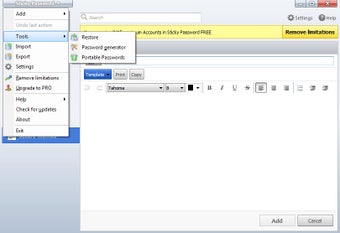
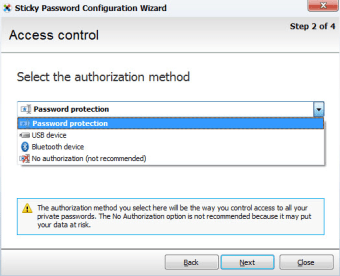
Sticky Password Free stands out from the crowd because it offers a host of other security functions that will make your password-protected accounts the safest around, even on top of managing your passwords. The program can be controlled more or less from the taskbar. You go to the icon and choose Add Account, and fill in the log in details related to the password in question.

Sticky Password Free is pretty intelligent. It automatically recognizes websites that you have added passwords for and fills in the details without prompting, so there’s no copying and pasting or any other timewasters. Sticky Password doesn’t just deal in passwords though – it also allows you to add online identities (no more boring address forms!) and secure notes.

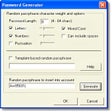
Sticky Password Free is packed full of features that really make it a great option. The program is very simple to use and has great configuration options. There’s also an automated password back-up function and Sticky Password Free's multi-level password generator will ensure that new passwords are very secure.

Overall impressions

With a great range of intelligent options, Sticky Password Free is a pleasure to use. It integrates smoothly into your browser and offers an auto lock-out function, so you don't have to worry if you leave your computer accidentally unattended. Team this with Sticky Password's automatic website recognition, and we're onto a winner.

The newest version of Sticky Password Free has taken an already great program and made it even better.

  • Pros

    • Makes using passwords very easy
    • Supports auto-fill of online profiles
    • Highly automatic
    • Excellent configuration options
  • Cons

    • Help is available online only
 0/5

App specs

  • Developer

  • License

    Free

  • Version

    8.8.5.1743
  • Latest update

  • Platform

    Windows

  • OS

    Windows 8

  • Language

    English

    Available languages

    • Czech
    • German
    • English
    • Spanish
    • French
    • Russian
  • Downloads

    22.5K

    Last month's downloads

    • 6
  • Size

    36.40 MB

Program available in other languages


Icon of program: Sticky Password Free

Sticky Password Free for PC

  • Free
  • 3.9
    33
  • 22.5K
  • V8.8.5.1743
Free Download for PC

View an ad to download for free


User reviews about Sticky Password Free

Have you tried Sticky Password Free? Be the first to leave your opinion!

Add review

You may also like

Alternatives to Sticky Password Free

Explore Apps

Latest articles

Laws concerning the use of this software vary from country to country. We do not encourage or condone the use of this program if it is in violation of these laws.
Softonic

Is Sticky Password Free safe?

100/100

Score result: Clean

This file passed a comprehensive security scan using VirusTotal technology. It is safe to download.

  • Virus free
  • Spyware free
  • Malware free
  • Verified by Security Partners

    VirusTotal logo

Scan Info

Last scan
Friday, September 27, 2024
Scan provider
VirusTotal · Full report

File Integrity

File
Sticky_Password_Free_V8.8.5.1743.exe
SHA256
d9d052842f02818bde0490acf5f89df9caf8bd7fac70785a4ae2fc80fb2272b6
SHA1
8f8a13499b76948b4ffa079389630b83db4d4842

Softonic security commitment

Sticky Password Free has been thoroughly scanned by our advanced security systems and verified by industry-leading partners. This file comes from the official developer and has passed all our security checks, showing no signs of viruses, malware, or spyware. For more information, visit our Security and Trust Center

Signed in to Softonic as